~5 min
T2 · Team skill
Package a repeatable check as a skill your whole team gets on ’git pull’.
Knowledge refresher — skills, scope, and slash commands
- What skills are — folders containing instructions, scripts, and resources Claude can load when needed. Claude only accesses a skill when it’s relevant to the task — useful for specialised, repeatable workflows. — Skills
- Three scope levels — same layered pattern as CLAUDE.md (T1) and MCP (T3):
- Project —
.claude/skills/committed to the repo; everyone gets it ongit pull - User —
~/.claude/skills/, all your projects on this machine - Organisation — deployed org-wide by admins
Nested skills (subdirectory-scoped) are a special case — they load when Claude works in that subdirectory rather than applying at the project, user, or organisation level.
Skills can also be synced from your claude.ai account (shown as 'claude.ai sync' in the / menu), or distributed as part of a plugin.
— Skills — where skills live - Project —
- Two ways to activate — Claude invokes a skill automatically when the task matches the
description:field semantically. You can also invoke directly with/skill-namein chat. The/menu shows all loaded skills alongside built-in commands. — Skills
Before you start
- Check: T1 is complete, or your project is open in VS Code (T2 builds on the
.claude/directory from T1). - Catch-up: T2 can run independently — you just need a project open in VS Code.
Anyone whose environment is not ready can follow along and complete the exercise afterwards.
Steps
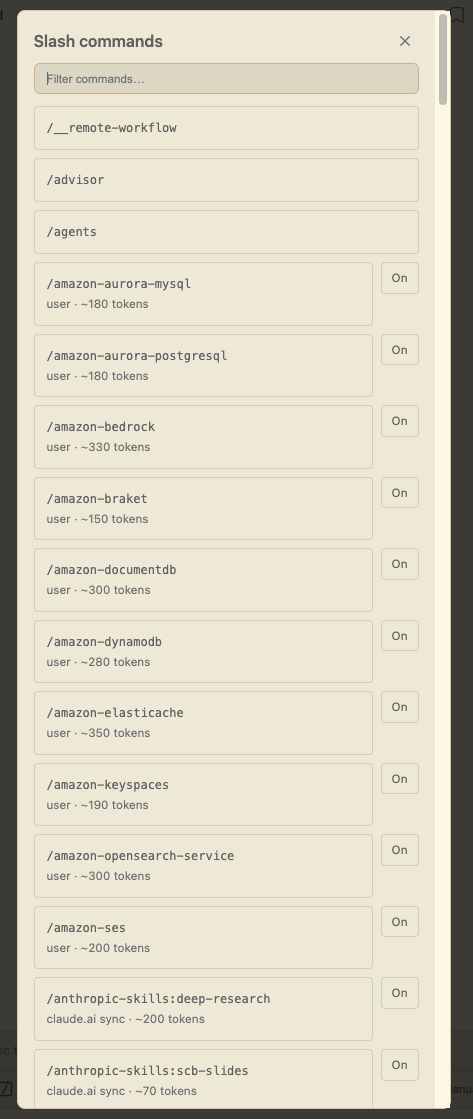
Type / in the Claude Code chat panel and browse the full list.
Then run /skills — this shows every skill currently loaded with its description and a rough token estimate.
The slash commands panel shows everything currently loaded — built-in commands, bundled skills, and your own. Skills from your claude.ai account appear as claude.ai sync. Each skill shows its scope and approximate token cost.
Docs: [1]
Create .claude/skills/house-checks/SKILL.md with this content.
File contents — not a command:
---
name: house-checks
description: Verify code changes before reporting a task as done. Use after editing code in this project.
---

# House checks

1. Run the checks: `uv run ruff check .`, `uv run ruff format --check .` and `uv run pytest -q`.
   If the project uses other commands, use the ones in its README or `pyproject.toml`.
2. Read the changes: `git diff`
3. Confirm no test was weakened. Look for removed or loosened assertions, new `skip` or `xfail` markers, deleted tests, and expected values changed without a reason in the task.
4. Report PASS or FAIL for each check, with evidence (the command and its key output lines). Never report the task as done while a check is failing.uv run ruff check ., uv run ruff format --check ., uv run pytest -q) with your project’s lint, format, and test commands. Keep the description and structure — just swap the commands.
Before writing your own skill: see Appendix 1 — Best practices for guidance, or use the skill-creator plugin (by Anthropic) to scaffold one interactively.
The folder name must match the name: field in the front matter. If .claude/skills/ already existed when the session started, the new skill is picked up automatically — no restart needed.
Run /skills in the Claude Code chat to confirm house-checks is listed.
Not seeing it? Run /reload-skills in the Claude Code chat to trigger an immediate rescan, or start a new session. Claude Code normally detects new skills automatically, but /reload-skills forces a fresh discovery if the skill was added after the session started. See live change detection docs.
/skills lists house-checks.
Docs: [2]
Type /house-checks in the Claude Code chat panel.
/house-checksClaude runs the four-step sequence: linter, formatter check, tests, then reports PASS or FAIL with evidence for each.
/skills        — loaded skills with descriptions and token estimates
/skill-doctor  — see what each skill costs in context and how often it is used; find ones worth disabling
/context       — full context window breakdown
No changes needed. These commands are always safe to run.
/skill-doctor requires Claude Code v2.1.252 or later. For a full list of built-in commands and bundled skills, see code.claude.com/docs/en/commands.
After this task, you should be able to
- Create a project skill from a
SKILL.mdfile and verify it loads with/skills - Understand the difference between
name:(slash command) anddescription:(auto-use trigger) - Know the difference between project and user skill scope
To build on this
- Best practices for writing skills — keep focused, write specific descriptions, never hardcode secrets → Appendix 1
- Monitor skill usage with
/skill-doctor— context cost and usage frequency per skill → Appendix 2 - Write skills that work beyond Claude Code — portable open-format skills for any harness → Appendix 3
- Scaffold a skill interactively — skill-creator marketplace plugin (optional helper) → Appendix 4
Appendix
1 — Best practices for writing skills
Keep these principles in mind when creating your own skills:
- Keep focused — one skill per workflow; small focused skills compose better than one large one
- Write specific descriptions — Claude uses
description:to decide when to auto-invoke; vague descriptions cause misfires - Start simple — plain markdown instructions first, add scripts only when needed
- Include examples — show Claude what good output looks like
- Never hardcode sensitive information — no API keys, passwords, or tokens in
SKILL.md
Full best practices: Best practices
2 — /skill-doctor — monitor skill usage
Every loaded skill adds to context on every turn. /skill-doctor shows what each skill costs in context and how often it is used — helping you find skills that take up context but rarely get used, so you can turn them off. Run it in the Claude Code chat panel.
How to interpret the report: skills with high token cost and low usage frequency are good candidates to disable. A skill you haven’t used in a session is still consuming context budget on every turn.
When to disable skills: if a skill is loaded globally (user scope) but you’re working on a project where it’s never relevant, disable it for that session or move it to project scope only.
Requires Claude Code v2.1.252 or later.
Docs: [1]
3 — Open format — skills beyond Claude Code
Claude Code skills follow the Agent Skills open standard but extend it. The 6 core frontmatter fields (name, description, version, author, license, compatibility) are part of the standard and portable across harnesses.
For harness-agnostic skills: use only those 6 fields; avoid Claude Code-only syntax (! shell preprocessing, $ARGUMENTS, ${CLAUDE_SKILL_DIR}).
Agent Skills spec: agentskills.io/specification — Claude Code frontmatter reference: Skills — frontmatter reference
4 — skill-creator plugin (optional helper)
Anthropic publishes a skill-creator plugin in the Claude marketplace that can help scaffold a new skill interactively. It is a marketplace plugin, not a built-in command — install it separately if you want to use it.
Not needed for this task — creating SKILL.md directly (as in Step 2) is the simplest path.
Marketplace: skill-creator plugin
References